Whimsical Ocean Animals Clipart Set: A Practical Guide for Creators
Digital design assets can make or break a creative project, yet many creators overlook the technical nuances that separate a professional finish from an amateur one. The Whimsical Ocean Animals Clipart Set offers a charming solution for those looking to inject personality into their work, but simply downloading files is not enough. To truly leverage this bundle of 20 quirky underwater illustrations, you must understand how to integrate them effectively into your workflow. This guide explores common pitfalls in using digital clipart and provides actionable advice to ensure your coastal-themed designs stand out for all the right reasons.
Understanding the Value of High-Resolution Transparency
One of the most frequent mistakes beginners make is ignoring resolution requirements until it is too late. When you purchase a digital download like this ocean animal bundle, the promise of "300 DPI" is critical. Many novices assume that because an image looks clear on their computer screen, it will print well on physical products. This is a dangerous assumption. Screen resolution typically sits at 72 or 96 DPI, which is insufficient for printing t-shirts, nursery decor, or greeting cards. If you resize a low-resolution image upward, it becomes pixelated and blurry, ruining the soft watercolor texture that makes these whimsical sea creatures appealing.
To avoid this, always verify the file specifications before starting your design. The Whimsical Ocean Animals Clipart Set provides high-quality PNG files specifically engineered for crisp, professional-quality printing. Ensure your design software is set to 300 DPI from the start. If you are creating digital-only content, such as social media graphics, you can work at 72 DPI to save file size, but keep the original 300 DPI masters archived. This dual approach ensures you are prepared for both print-on-demand opportunities and quick digital marketing posts without compromising quality.
The Trap of Ignoring Background Compatibility
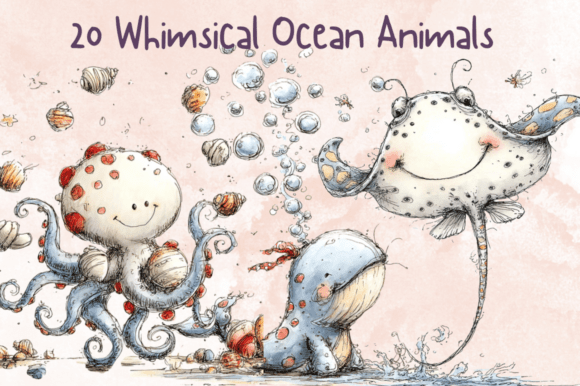
Another common oversight involves background handling. While this bundle features transparent backgrounds, some users mistakenly place these illustrations over busy or clashing patterns, which diminishes the visual impact of the quirky details. The charm of these whales, octopuses, and turtles lies in their expressive personalities and soft edges. Placing them against a chaotic backdrop can obscure these nuances, making the design feel cluttered rather than cohesive.
A better approach is to treat the transparent PNGs as layered elements. Use solid pastel colors or subtle gradients that complement the watercolor aesthetic. For instance, if you are designing nursery decor, pair the whimsical fish with a soft sand or pale blue background. This allows the intricate details of the clipart to breathe. Additionally, always check the edges of your PNGs after importing them into your software. Occasionally, residual white halos from the original creation process can appear. Most professional design tools allow you to refine edge detection or use blending modes to seamlessly integrate the illustration into your canvas.
Licensing and Commercial Use Misconceptions
Perhaps the most serious error small business owners make is misunderstanding licensing terms. Just because you have downloaded a Whimsical Ocean Animals Clipart Set does not automatically grant you unlimited commercial rights. Many creators assume that purchasing a digital download means they can resell the clipart itself or use it in any manner without restriction. This is rarely the case. Most standard licenses allow you to use the graphics in end products—such as printed t-shirts, stickers, or invitations—but prohibit the redistribution of the raw PNG files.
Before launching any product line, read the license agreement included with your download. If you plan to sell items on platforms like Etsy or Amazon Merch, ensure your usage complies with the creator’s terms. For example, using these ocean animals for sublimation projects on sweatshirts is typically permitted, but selling the individual whale or crab images as standalone digital stickers is usually forbidden. Clarifying this early prevents costly takedowns and protects your shop’s reputation. If you are unsure, contact the artist directly for clarification. It is a small step that safeguards your business integrity.
Optimizing Workflow for Efficiency
Efficiency is often sacrificed when creators do not organize their digital assets properly. Downloading a bundle of 20 files can lead to a cluttered desktop if not managed correctly. A disorganized file structure slows down the design process, causing frustration and wasted time searching for specific creatures like the playful crab or the serene turtle. To counter this, create a dedicated folder for your underwater clipart immediately after download. Subdivide this folder into categories if necessary, such as "Mammals," "Fish," and "Invertebrates," even if the original download does not provide this structure.
Furthermore, consider creating a swatch library or a preset palette based on the colors found in the Whimsical Sea Life Graphics. Since these illustrations share a cohesive watercolor style, extracting their dominant hues can help you maintain color consistency across your entire product line. This technique is particularly useful for coastal boutique collections where brand identity relies on a harmonious visual language. By pre-selecting your colors, you reduce decision fatigue and speed up the creation of complementary marketing materials.
Choosing the Right Applications for Your Design
Not every project benefits from the same type of clipart application. A common mistake is forcing these whimsical illustrations into contexts where they do not fit tonally. While these quirky underwater illustrations are perfect for children’s books and nursery themes, they may not suit corporate marine conservation reports or high-end luxury branding without significant modification. Understanding the target audience is key. For educators and parents, the playful nature of the octopus and fish designs engages young learners effectively. For small business owners creating summer sale flyers, the vibrant colors attract attention without appearing overly childish.
When using these graphics for storytelling-themed products, consider the narrative flow. Arrange the animals in a way that suggests movement or interaction. For example, position the whale and the smaller fish to create a sense of scale and depth. This adds dynamism to static images, making them more engaging for viewers. In scrapbooking or junk journals, layer multiple elements from the bundle to create complex compositions. The transparent backgrounds facilitate this layering, allowing you to build rich, textured scenes that tell a deeper visual story.
Final Checks Before Publication
Before finalizing any project, perform a thorough review. Zoom in to 100% to check for any pixelation or alignment issues. Ensure that text placed over or near the clipart is legible and does not compete with the illustrations for attention. Contrast is essential; if the watercolor tones are light, use darker text, and vice versa. Additionally, proofread any accompanying copy to ensure it aligns with the whimsical tone of the visuals. A mismatch between serious text and playful graphics can confuse the viewer and dilute your message.
By avoiding these common pitfalls and adhering to best practices, you can maximize the potential of your Whimsical Ocean Animals Clipart Set. Whether you are a seasoned designer or a hobbyist exploring new creative avenues, attention to detail transforms simple digital downloads into polished, professional products. Embrace the quirks of these underwater friends, respect the technical requirements, and let your creativity flow with confidence.